
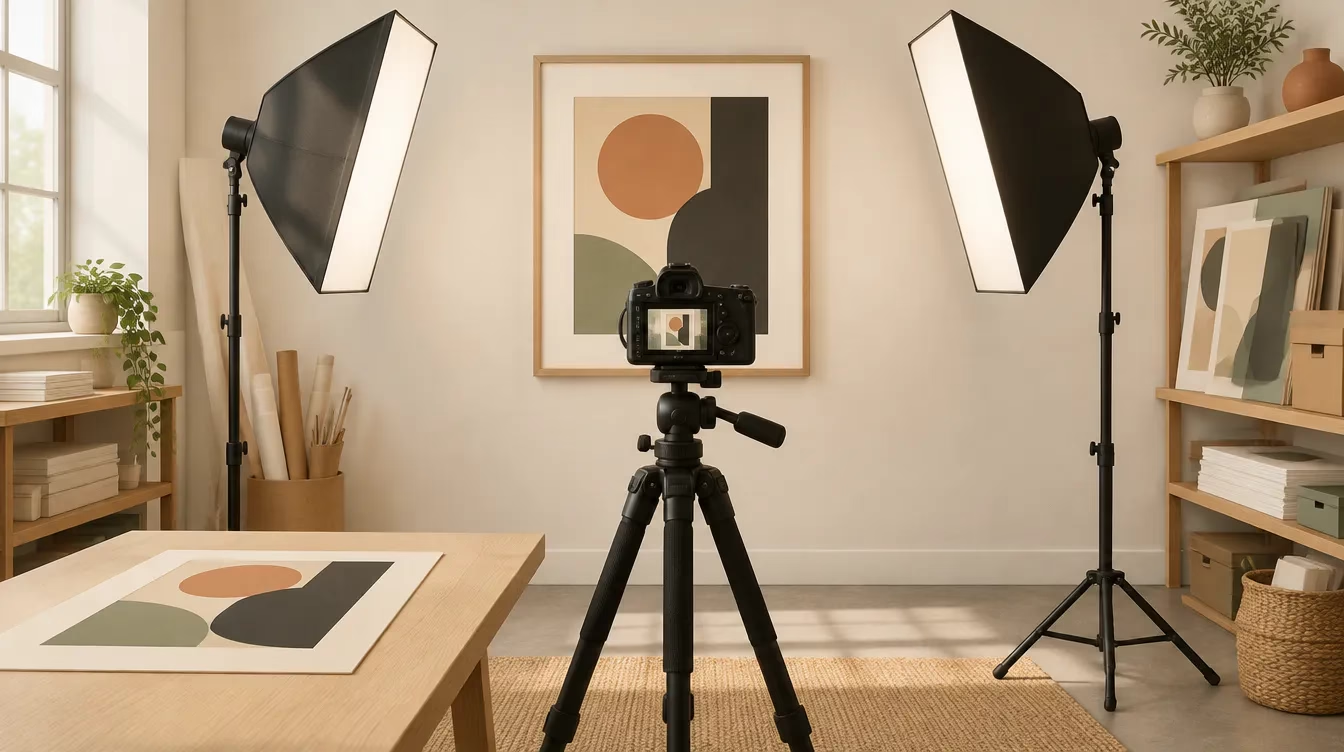
The short version of how to photograph artwork for online sales: hang the piece flat, square the camera to its centre, and light it with two matched lamps at 45 degrees. Set white balance from a grey card and shoot RAW on a tripod at low ISO. Remove the glass, or cross-polarise the lights to kill glare.
Key takeaways
- Even light matters more than expensive light. Two identical lamps at equal distance and 45 degrees will light most flat work up to poster size.
- Keep the camera sensor parallel to the artwork and use a 50mm to 100mm lens, so the edges stay straight.
- A grey card or colour target in the first frame gives you a white balance you can trust.
- Cross-polarisation removes glare from varnish and glass. It also deepens colour and flattens brushwork, so check the result against the original.
- Etsy recommends listing photos at least 2000 px on each side in sRGB, and allows up to 20 photos per listing.
What equipment do you need to photograph artwork?
You need a camera or recent phone, a tripod, two identical lights and a grey card. A buyer can’t see the piece in person, so the kit exists to deliver two things: straight edges and honest colour.
- Camera. A mirrorless or DSLR camera that shoots RAW. A phone with a telephoto lens and a RAW mode works for listing photos.
- Lens. A 50mm to 100mm prime or a zoom set in that range. Wide lenses bend straight edges.
- Tripod and level. The camera has to sit square to the work and stay still.
- Two matched lights. Two of the same flash or LED panel with the same modifier. Mixed bulbs give mixed colour.
- Grey card or colour target. This is your colour reference.
- Black cloth. It blocks reflections of the room and the camera when you shoot glazed work.
How to photograph artwork step by step
Set the artwork, the camera and the lights in that order, and check evenness before you shoot the first frame.
- Hang the work flat on a neutral wall, or lay small pieces on the floor and shoot down from above. Take it out of the frame if you can.
- Darken the room. Close the blinds and switch off the ceiling lights so your two lamps are the sole light source.
- Put the camera on a tripod at the height of the artwork’s centre. Keep the sensor parallel to the surface. If the edges of the piece converge in the viewfinder, level the camera again.
- Place one light on each side at 45 degrees to the surface, at equal distance and height. For large work, move both lights further back to even out the spread.
- Check evenness. Photograph a sheet of white board in the artwork’s place and look for darker corners, or take a meter reading at the centre and at each corner.
- Set the camera to its base ISO, f/8 and RAW. Use a remote or the self-timer.
- Shoot a frame with the grey card or colour target held flat against the artwork. Set white balance from that frame in editing.
- Fill the frame with the work and leave a small margin for cropping. Shoot it, then check focus at 100% in all four corners.
On a bright overcast day you can skip the lamps. Hang the piece outside in open shade, away from coloured walls, and follow the same camera steps. Cloud cover gives you a single large, even source.
How do you avoid glare on glass, varnish and metallic paint?
Glare is a reflection of your lights, so the first fix is to move them. Slide both lamps to a shallower angle to the surface, closer to the wall, until the hot spots leave the frame. Take glazed work out from behind its glass. If the glass stays, hang black cloth behind the camera with a hole for the lens.
Cross-polarisation
For varnished oils, resin and work sealed behind glass, cross-polarisation is the reliable fix. You put a sheet of linear polarising film over each light and a polarising filter on the lens, then rotate the lens filter until the glare disappears. Antonino Cosentino’s guide to polarised light photography for art documentation at Cultural Heritage Science Open Source shows the setup and the trade-offs. The filters cost you several stops of light. Colours record more saturated than they look in the room. Brushwork and impasto can flatten.
I don’t cross-polarise metallic leaf or iridescent paint, because the technique removes the shine that defines them. For those pieces I light with a broad soft source and accept a controlled sheen.
Texture shots
Buyers of oils and mixed media want to see the surface. After the flat copy shot, switch off one lamp and move the other to a low raking angle. Shoot a close detail. That frame goes in the listing beside the full view.
How do you get accurate colour?
Colour accuracy comes from a known reference, one light colour and a calibrated screen.
- Shoot the grey card or colour target under the same light as the artwork.
- Set white balance from the card in your RAW editor. With a colour target, build a camera profile.
- Calibrate your monitor with a hardware calibrator.
- Hold the original beside the screen under daylight-balanced light and compare. Adjust until the hardest colours match, which are often deep blues, violets and fluorescent pigments.
- Export web files in sRGB. Etsy tells sellers to convert images to sRGB before uploading so on-site colours match the originals. Keep a full-resolution 16-bit master for print.
Museums and archives measure this. The US federal FADGI technical guidelines for digitizing cultural heritage materials (third edition, 2023) grade a capture at one of four star levels. Operators photograph a reference target and measure colour accuracy and lighting evenness against set tolerances. You don’t need that standard for an Etsy listing. It’s the right benchmark to ask about when you commission print masters of high-value work.
What do Etsy and other marketplaces require?
Etsy’s rules are light on restrictions and specific on size. These figures come from Etsy Help in October 2026.
| Item | Etsy guidance |
|---|---|
| Recommended size | Width and height of at least 2000 px |
| First photo | At least 635 px on each side; horizontal or square |
| File size | Files over 1MB may fail to finish uploading |
| Colour profile | sRGB |
| File types | .jpg, .gif, .png, .svg or .heic |
| Photos per listing | Up to 20 |
| Video | Up to 2 videos of 5 to 15 seconds |
Etsy’s listing instructions also tell sellers of handmade items to use their own photographs. My Etsy product photography guide covers thumbnails and photo order in more depth. If you sell from your own store, the Shopify product photography guide covers that side.
Shot list for an artwork listing
| Shot | What it shows | Tip |
|---|---|---|
| Full front | The whole piece, square to camera in even light | Crop to the edges of the work |
| Angled view | Canvas depth, edges and frame profile | Shoot from one side |
| Detail | Brushwork, paper texture or print dot | Raking light |
| Signature | Signature, edition number or stamp | Fill the frame |
| Back | Hanging hardware, stretcher and labels | Buyers ask about wiring |
| In a room | The piece on a wall above furniture | Shows scale without a tape measure |
| Framing options | Each frame or mat you offer | Match the angle across options |
| Packaging | Tube, corner protectors, certificate | Reassures buyers about shipping |
Files for prints
A print needs far more pixels than a listing. Many print labs ask for 300 pixels per inch at the final size, so a 24 x 36 inch print at that figure needs a 7200 x 10800 px file. One frame from most cameras falls short of that. A photographer reaches it by shooting the work in sections and stitching them, or with a high-resolution camera.
Do you need permission to sell photos or prints of artwork?
You do if someone else made the art. Under US copyright law, owning a physical artwork is separate from owning its copyright (17 U.S.C. 202). Buying a painting gives you the object, and the right to make and sell reproductions stays with the artist unless an agreement says otherwise. Artists selling prints of their own work hold that right from the start. This is general information, so check a specific case with your own attorney.
When should you hire a professional?
Once you know how to photograph artwork at home, DIY is the right call for small, matte work headed for an online listing: watercolours, drawings, unvarnished acrylics and flat prints. A flatbed scanner also does a good job on unframed works on paper that fit the glass. My guide on how to take pictures for e-commerce covers the basics of a home setup.
Hire a photographer when one of these applies:
- The piece is larger than your two lights can cover without falloff.
- The surface is varnished, resin-coated, metallic or sealed behind glass you can’t remove.
- You need print masters, where resolution and colour have to hold up at full size.
- You have a whole series to shoot for a show, a catalogue or a shop launch, and it has to match.
A batch of artwork fits a studio booking. My half-day rate is $1,500, and the count, the sizes and the surfaces decide where a job lands in that range. See my product photography pricing page and my product photography services for what a session includes.
Frequently asked questions
Can I photograph artwork with a phone?
Yes, for listing photos. Mount the phone on a tripod, switch to the telephoto lens to keep edges straight, turn on RAW capture and light the work with two matched lamps or open shade. A phone file meets Etsy’s 2000 px recommendation. It falls short for large print masters, which need more resolution.
How do I photograph art behind glass without reflections?
Take the art out of the frame if you can. If the glass stays, darken the room, hang black cloth behind the camera with a hole for the lens, and move both lights to a shallow angle. For stubborn glare, cross-polarise: polarising film on each light and a polarising filter on the lens.
What resolution do I need to make prints from a photo of my artwork?
Multiply the print size in inches by the pixels per inch your lab asks for. Many labs ask for 300. A 16 x 20 inch print at 300 pixels per inch needs a 4800 x 6000 px file, and a 24 x 36 inch print needs 7200 x 10800 px. Ask your lab before the shoot.
Is it better to scan or photograph artwork?
Scan small, flat, unframed works on paper that fit on a flatbed. Photograph anything larger, anything with texture, and anything on canvas or board. A scanner lights the surface from a fixed angle at close range, which can flatten impasto and glare off metallic paint. A camera lets you choose the light.
Can I sell prints of a painting I bought?
Owning the painting doesn’t give you that right. Under 17 U.S.C. 202, ownership of the object is separate from ownership of the copyright, and the artist keeps reproduction rights unless an agreement transfers them. Ask the artist for a licence, and check with an attorney, before you sell prints. This answer is general information.
Get a quote for your artwork
Send me the number of pieces and the size and medium of each. Tell me which ones sit behind glass, and say if you need listing images, print masters or both. Include your deadline. I’ll reply with a plan and a quote for the batch. Send your artwork list and sizes to start.

